> For the complete documentation index, see [llms.txt](https://docs.certinext.io/llms.txt). Markdown versions of documentation pages are available by appending `.md` to page URLs; this page is available as [Markdown](https://docs.certinext.io/documentation/certificate-lifecycle-management/ordering-a-certificate/as-a-customer/ordering-ev-code-signing-certificates/phase-2-steps-via-email-and-emsign/order-tracking.md).
# Order Tracking
*After payment, if you go back to CERTInext and navigate to Certificates > Orders, you will see your new order listed. Clicking on it opens the full Order Details page.*
**Information shown on the Order Details page:**
• Order ID, Ordered Date, Product (Code Signing - EV), Group, CA Source (emSign), Certificate Price, Order Status, and Certificate Status
• SSL Subscription Information: Subscription period, start/end dates, and subscription status
• Auto-Renewal Configuration: Whether auto-renewal is enabled for this certificate
• Organization Representative Information: The details of the person who placed the order
• Authorized Representative Information: If nominated, shown here
• Authorized Signatory Information: Contract Signer and Certificate Approver details
• Organization Information: Your full registered organization details
• Certificate Requestor Information: The person who requested this specific certificate
• Certificate Information: Company DUNS / Registration Number
• Additional Information: Tags and Order Remarks if entered
• Renewal Notifications: Whether renewal email notifications are enabled
**Order Status indicators to look out for:**
• "Order Accepted" – Your payment was received and the order is in progress
• "Pending for Validation" (Certificate Status) - emSign is waiting for all verification actions to be completed
• "Approved by Second Approver" - All approvals are done; issuance is being processed
• "Issuance Pending" – Certificate is being prepared for download
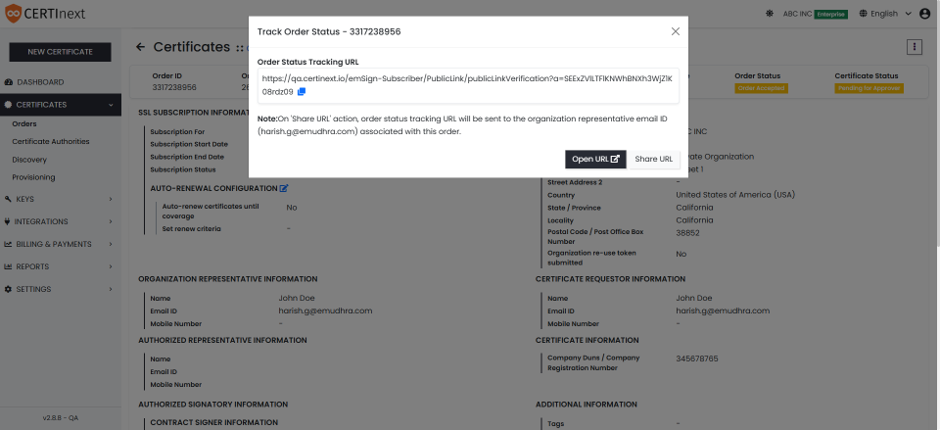
**Track Order Status feature:**
On the Order Details page, there is an option to open or share your Order Status Tracking URL. This is a direct link to a page showing the current status of your order.
• *Click "Open URL" to open the tracking page in your browser.*
• *Click "Share URL" to get the link to share with others (e.g., your manager or team). Note: When you use "Share URL," the tracking link is also sent to the Organization Representative's email on file.*