> For the complete documentation index, see [llms.txt](https://docs.certinext.io/llms.txt). Markdown versions of documentation pages are available by appending `.md` to page URLs; this page is available as [Markdown](https://docs.certinext.io/documentation/certificate-lifecycle-management/ordering-a-certificate/as-a-customer/ordering-ov-public-trust-certificates/phase-2-steps-via-email-and-emsign/organization-reuse-consent.md).
# Organization Reuse Consent
#### 2.4 Organization Re-use Consent (If Applicable)
When your order re-uses a previously validated organization (which is the standard case when selecting a pre-validated organization in Step 3), the system requires the Organization Representative to formally consent to this re-use. This is a security measure to prevent unauthorized use of an organization's validated identity.
**When Does This Apply?**
Consent is required whenever a new certificate order re-uses an organization's existing validated details and subscriber agreement.
If this is your very first order for an organization that is being validated fresh, you will not see a consent request at this stage - the CA will contact you separately for validation.
#### 2.4a Consent Required Email
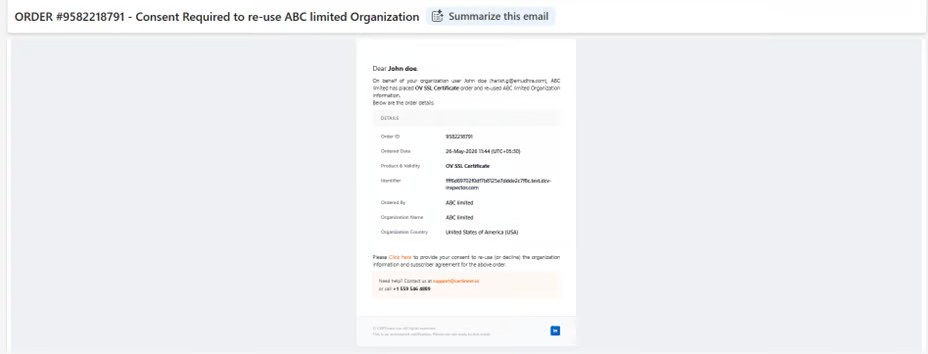
*The Organization Representative receives an email with the subject: 'ORDER #\[ID] - Consent Required to re-use \[Organization] Organization'.*
The email contains the order details (Order ID, Ordered Date, Product & Validity, Identifier/domain, Ordered By, Organization Name, Organization Country) and a 'Click here' hyperlink to open the consent page.
**Action**
*Click the 'Click here' link in the email to open the emSign Consent page.*
#### 2.4b emSign Consent Page
**The consent page displays:**
*A notification message identifying the order, the organization being re-used, and the person who placed the order.*
Order details: Order ID, Date Ordered, Ordered By
Organization details: Organization ID, Organization Name, Country
Consent statement: 'Accepting this consent means that you allow this order to re-use your organization information & subscriber agreement.'
Two buttons: Accept (orange) and Decline (red)
**Important**
*If you recognize this order and authorize it, click Accept.*
*If you did NOT authorize this order or do not recognize it, click Decline immediately and contact your CERTInext administrator.*
Declining will halt the certificate issuance for this order.
#### 2.4c Consent Confirmation Dialog (OV Wildcard SSL, OV UCC SSL, OV Wildcard UCC SSL only)
**Product Difference**
*For OV Wildcard SSL, OV UCC SSL, and OV Wildcard UCC SSL orders, clicking Accept on the consent page triggers an additional Consent Confirmation dialog.*
This extra step does NOT appear for OV SSL Certificate orders.
*A modal dialog appears asking: 'Are you sure you want to accept the consent?'*
*Click Yes to confirm your consent.*
*Click No to cancel and return to the consent page.*
#### 2.4d Consent Accepted Confirmation
*After clicking Accept (and Yes in the confirmation dialog where applicable), a confirmation screen displays: 'Thank you for providing your consent to re-use \[Organization Name].' This confirms the consent has been recorded.*
**Note - Subscriber Agreement**
*Once consent is provided, the Subscriber Agreement step (Step 3 in the Order Actions) is typically auto-completed as part of the consent process.*
*Return to the emSign Subscriber Portal to verify the status.*